Taskably
Taskably
Taskably is a modern freelancing platform I helped design to streamline how clients and freelancers connect, collaborate, and manage contracts.
CLIENT
Early-stage Startup
CATEGORY
Freelance Collaboration Platform
PROJECT YEAR
2023 - 2024
Taskably streamlines the freelancing experience — from discovering top talent to managing contracts seamlessly. Clients can easily browse services and collaborate with freelancers, while freelancers can professionally showcase their work and manage projects.
Taskably streamlines the freelancing experience — from discovering top talent to managing contracts seamlessly. Clients can easily browse services and collaborate with freelancers, while freelancers can professionally showcase their work and manage projects.
Working directly with the founders, I shaped the product’s UX and UI to support core marketplace features and ensure it could scale as the business grows. The goal was to build a product that feels clear, credible, and flexible — even in its early stage.
Working directly with the founders, I shaped the product’s UX and UI to support core marketplace features and ensure it could scale as the business grows. The goal was to build a product that feels clear, credible, and flexible — even in its early stage.
Working directly with the founders, I shaped the product’s UX and UI to support core marketplace features and ensure it could scale as the business grows. The goal was to build a product that feels clear, credible, and flexible — even in its early stage.
Simplifying Freelance Collaboration.
Simplifying Freelance Collaboration.
Simplifying Freelance Collaboration.
GOAL
GOAL
The goal of this project was to design a user-friendly freelancing platform that simplifies how clients and freelancers connect and collaborate. By improving the discovery, communication, and project management workflows, Taskably aims to make the freelance process smoother and more transparent for both parties — from posting services to closing contracts.
SOLUTION
SOLUTION
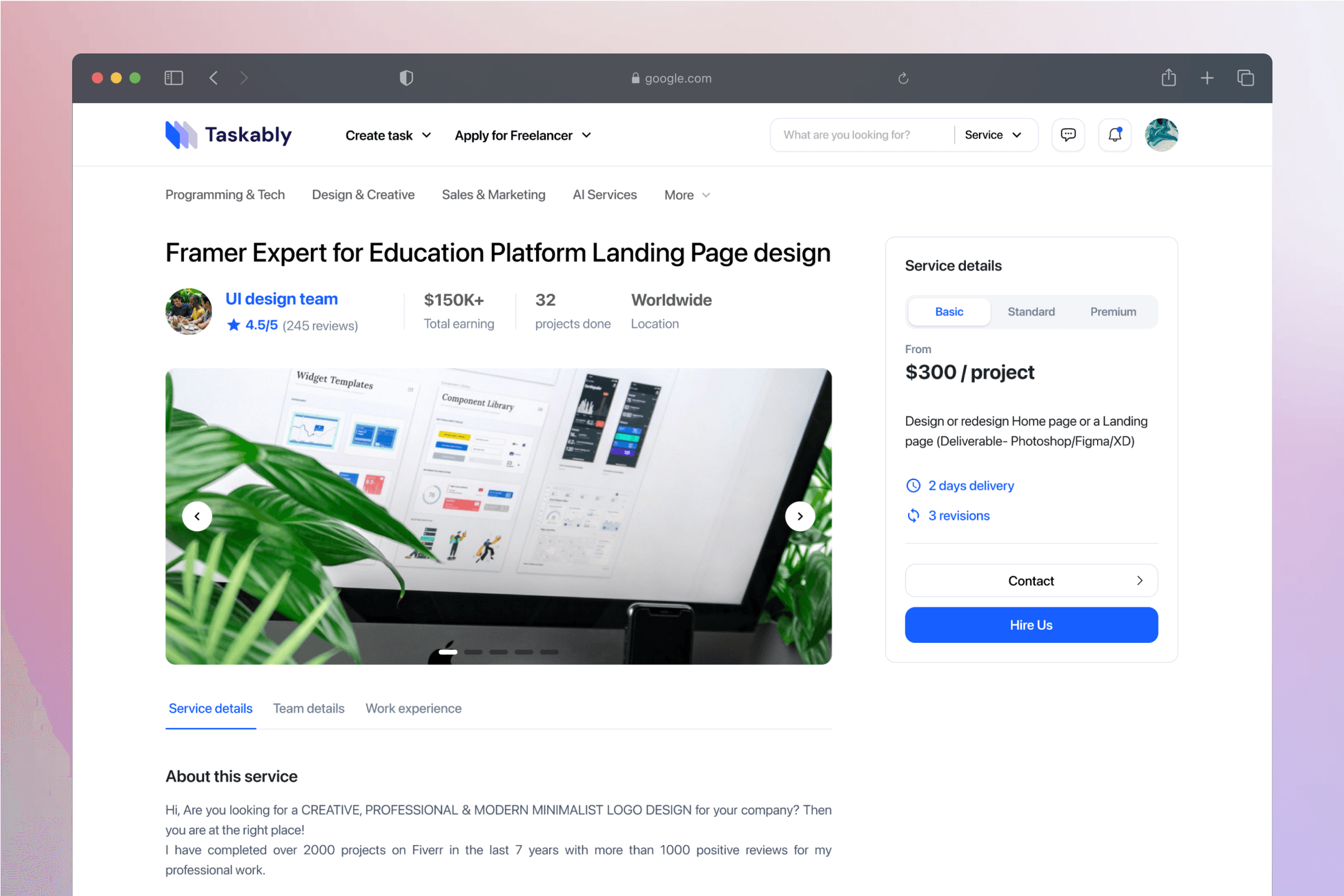
To realize my client’s vision of a smarter, more intuitive freelance platform, I focused on designing an experience where intelligent features feel natural and helpful — not overwhelming. One standout capability is the AI-powered matching system, which suggests the most suitable freelancers for each task (“quest”) based on the client’s needs, project details, and freelancer profiles.
My role was to shape how this technology is introduced and experienced: surfacing matches in a clear, trustworthy way, allowing users to adjust preferences, and keeping the interface focused and approachable. From service browsing to real-time chat and contract handling, every touchpoint was designed to balance efficiency with clarity — turning complex logic into an effortless workflow for both clients and freelancers.
To realize my client’s vision of a smarter, more intuitive freelance platform, I focused on designing an experience where intelligent features feel natural and helpful — not overwhelming. One standout capability is the AI-powered matching system, which suggests the most suitable freelancers for each task (“quest”) based on the client’s needs, project details, and freelancer profiles.
My role was to shape how this technology is introduced and experienced: surfacing matches in a clear, trustworthy way, allowing users to adjust preferences, and keeping the interface focused and approachable. From service browsing to real-time chat and contract handling, every touchpoint was designed to balance efficiency with clarity — turning complex logic into an effortless workflow for both clients and freelancers.
To realize my client’s vision of a smarter, more intuitive freelance platform, I focused on designing an experience where intelligent features feel natural and helpful — not overwhelming. One standout capability is the AI-powered matching system, which suggests the most suitable freelancers for each task (“quest”) based on the client’s needs, project details, and freelancer profiles.
My role was to shape how this technology is introduced and experienced: surfacing matches in a clear, trustworthy way, allowing users to adjust preferences, and keeping the interface focused and approachable. From service browsing to real-time chat and contract handling, every touchpoint was designed to balance efficiency with clarity — turning complex logic into an effortless workflow for both clients and freelancers.
Product Highlights
Product Highlights
Product Highlights
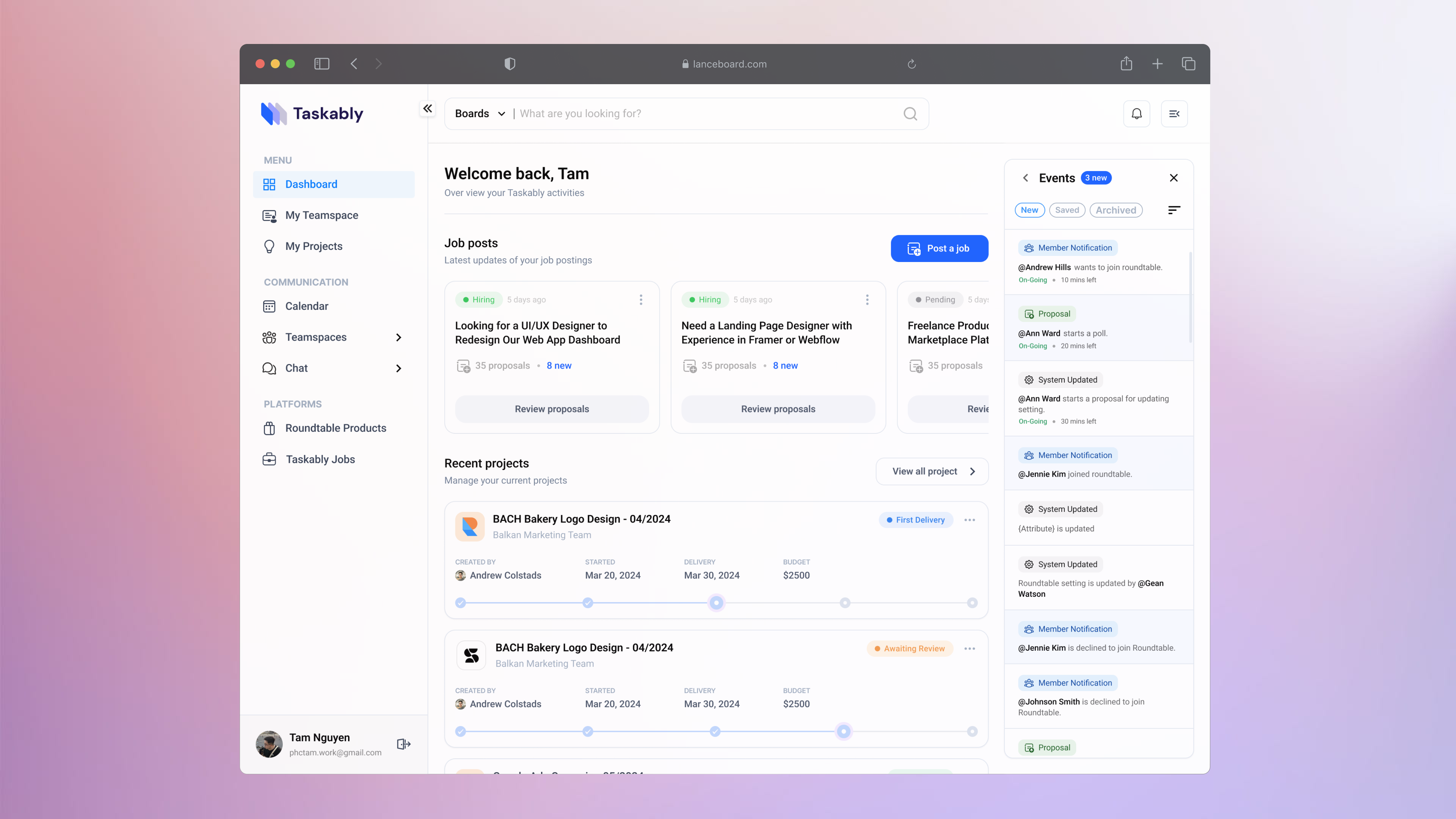
Dashboard Overview - A central hub for managing jobs, projects, and platform activity.
Dashboard Overview - A central hub for managing jobs, projects, and platform activity.
This screen brings together a user's active jobs, project progress, and team updates into one streamlined view. Actionable items like posting new jobs or reviewing proposals are placed front and center, while the side panel keeps users informed of recent activities.
The layout is crafted for efficiency and clarity, using a strong visual hierarchy, consistent card styles, and clear status cues. Everything is designed to help users stay oriented and make quick decisions without feeling overwhelmed.
This screen brings together a user's active jobs, project progress, and team updates into one streamlined view. Actionable items like posting new jobs or reviewing proposals are placed front and center, while the side panel keeps users informed of recent activities.
The layout is crafted for efficiency and clarity, using a strong visual hierarchy, consistent card styles, and clear status cues. Everything is designed to help users stay oriented and make quick decisions without feeling overwhelmed.
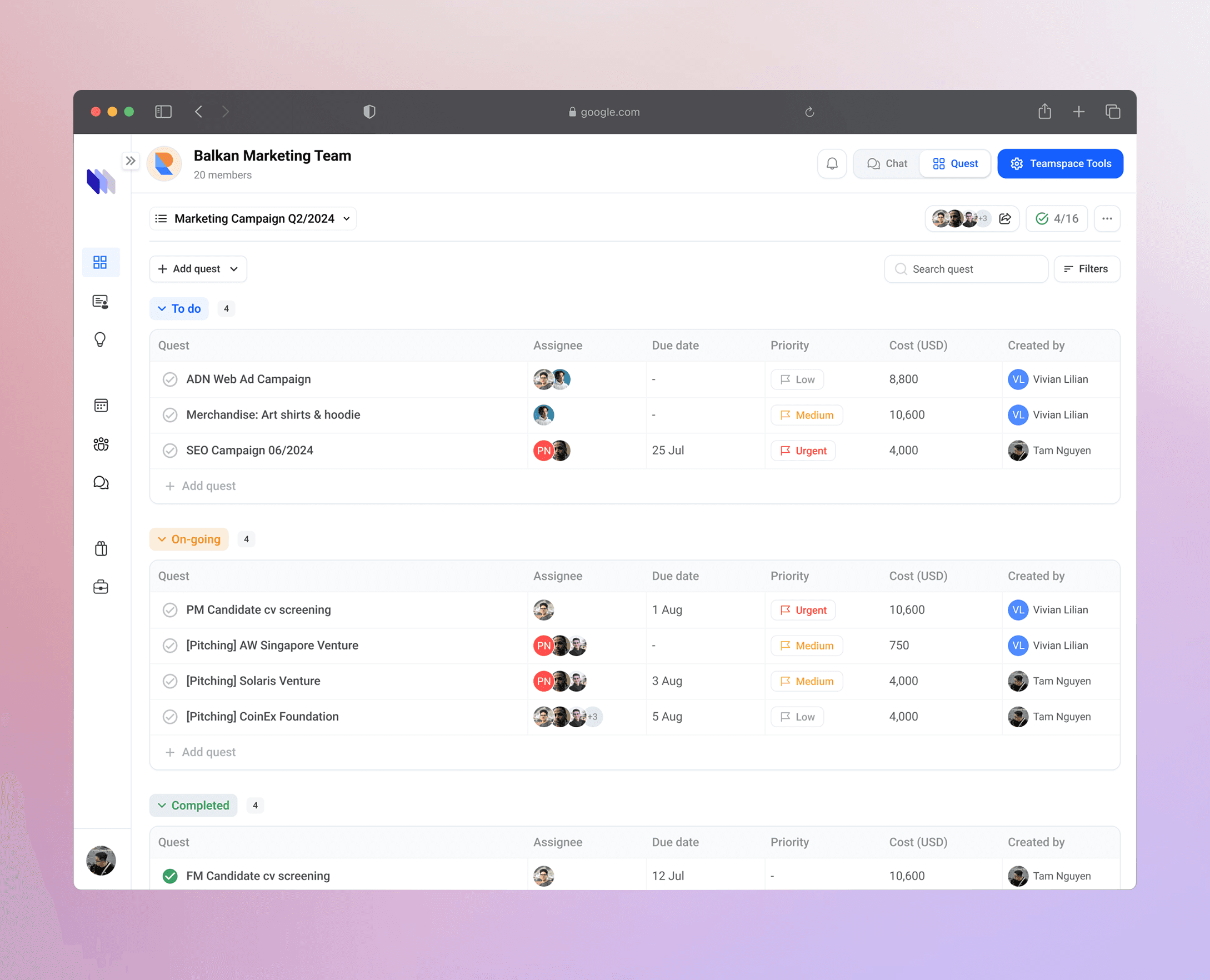
Task Management – A streamlined workspace for tracking project tasks
Task Management – A streamlined workspace for tracking project tasks
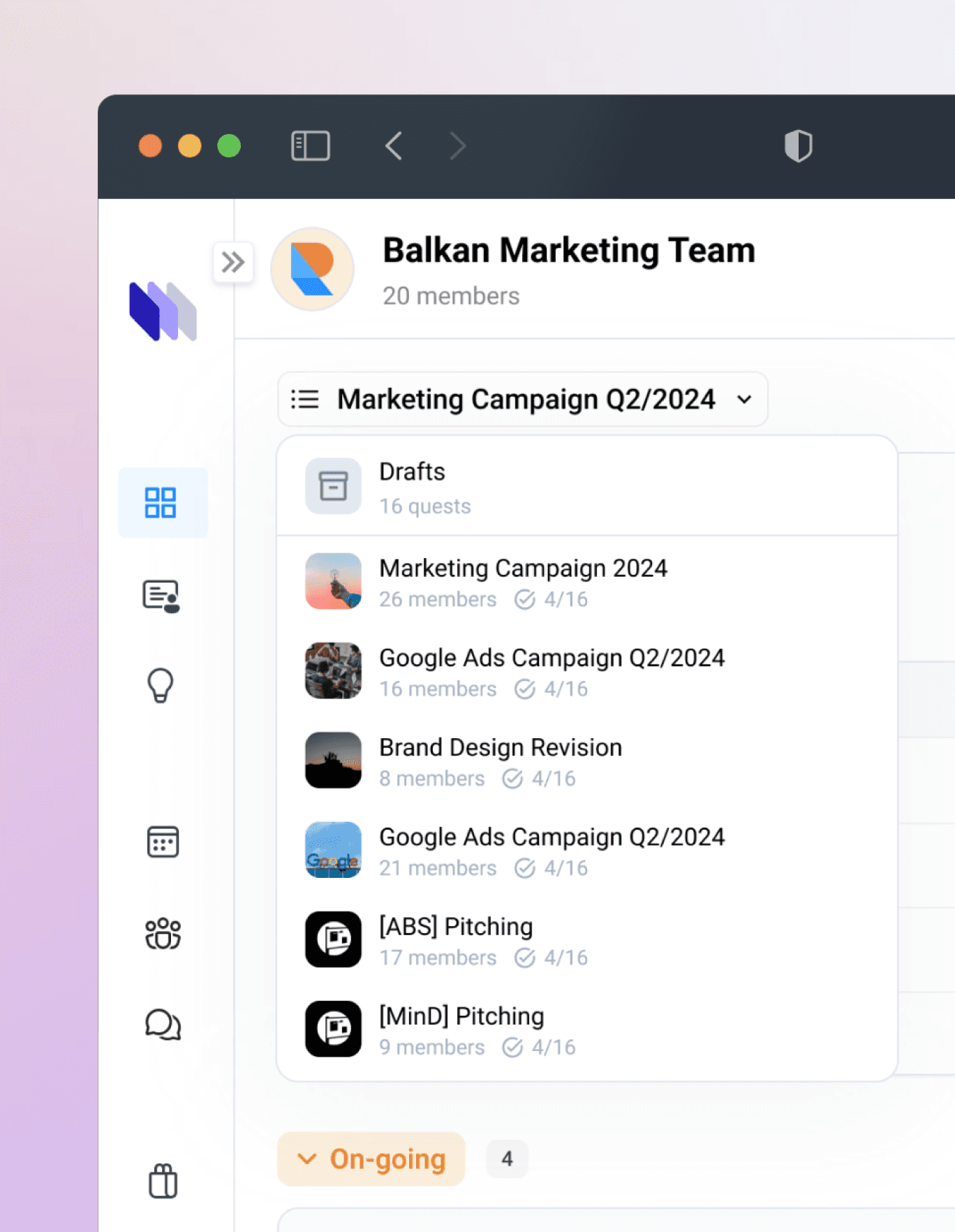
This screen gives users a clear overview of ongoing work within a selected project. Tasks are grouped by status — To Do, On-going, and Completed — with essential details like assignee, due date, priority, and cost instantly visible.
The layout emphasizes clarity and quick scanning. Each row balances structure with flexibility, and the subtle card grouping helps users navigate different task phases without losing sight of the bigger picture. Designed for collaboration, every quest stays accessible and editable — even in complex, team-driven workflows.
This screen gives users a clear overview of ongoing work within a selected project. Tasks are grouped by status — To Do, On-going, and Completed — with essential details like assignee, due date, priority, and cost instantly visible.
The layout emphasizes clarity and quick scanning. Each row balances structure with flexibility, and the subtle card grouping helps users navigate different task phases without losing sight of the bigger picture. Designed for collaboration, every quest stays accessible and editable — even in complex, team-driven workflows.
Freelancer Proposal – A detailed view of candidate submissions for your project
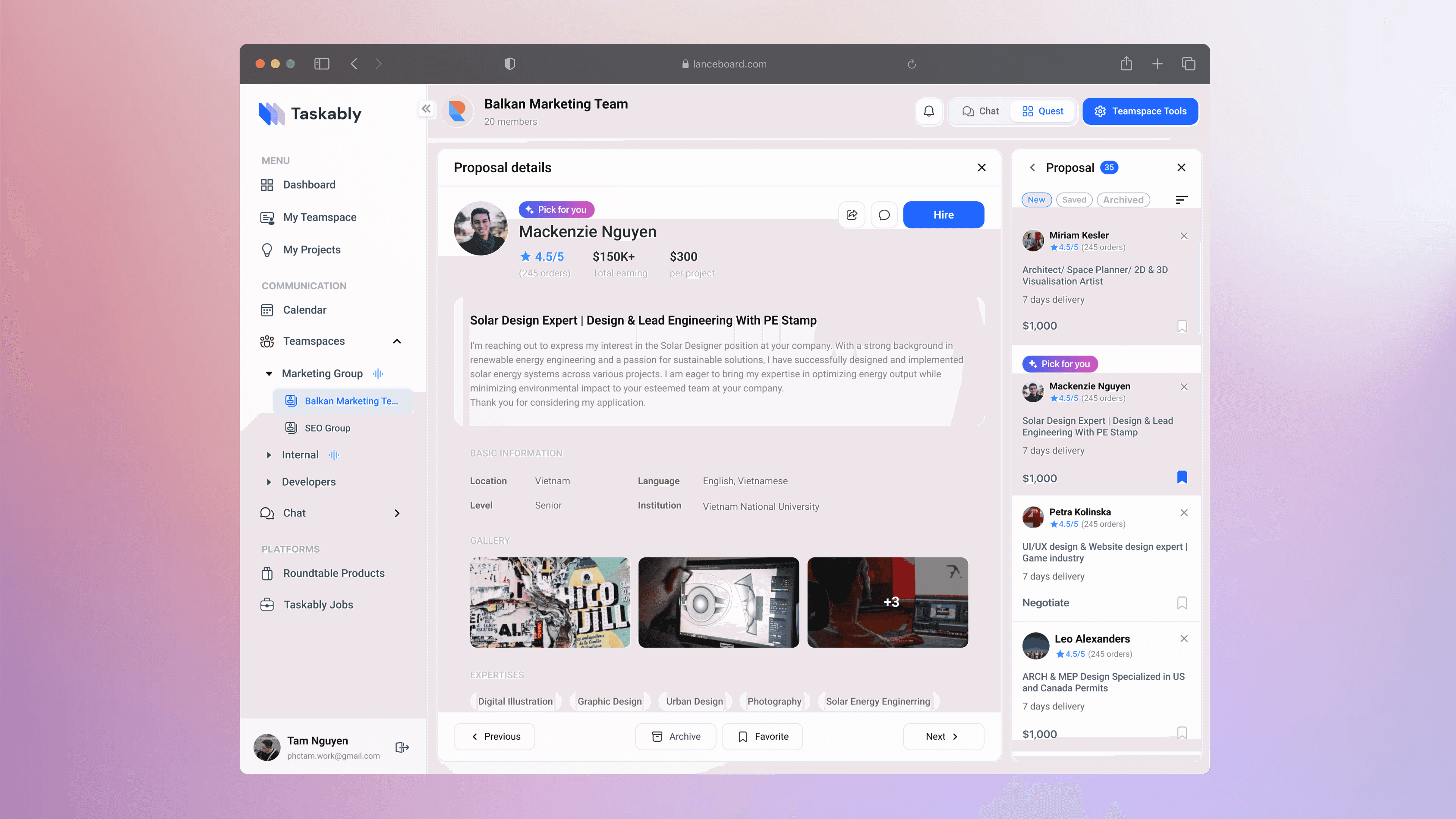
Freelancer Proposal – A detailed view of candidate submissions for your project
This screen brings together detailed freelancer profiles and a browsable proposal list in a clean split layout. The structure supports fast decision-making, letting users scan, shortlist, or take action without losing context.
This screen brings together detailed freelancer profiles and a browsable proposal list in a clean split layout. The structure supports fast decision-making, letting users scan, shortlist, or take action without losing context.

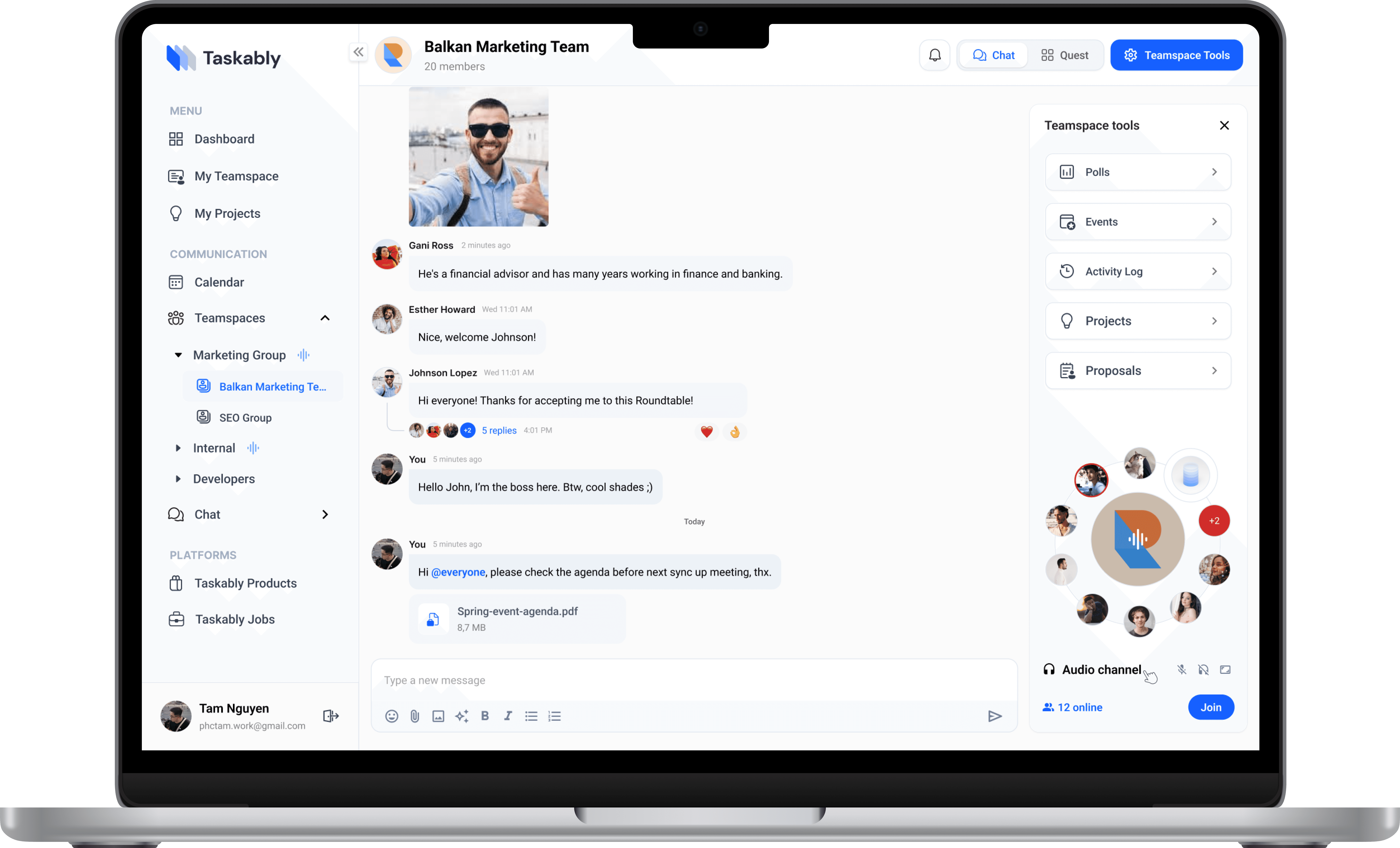
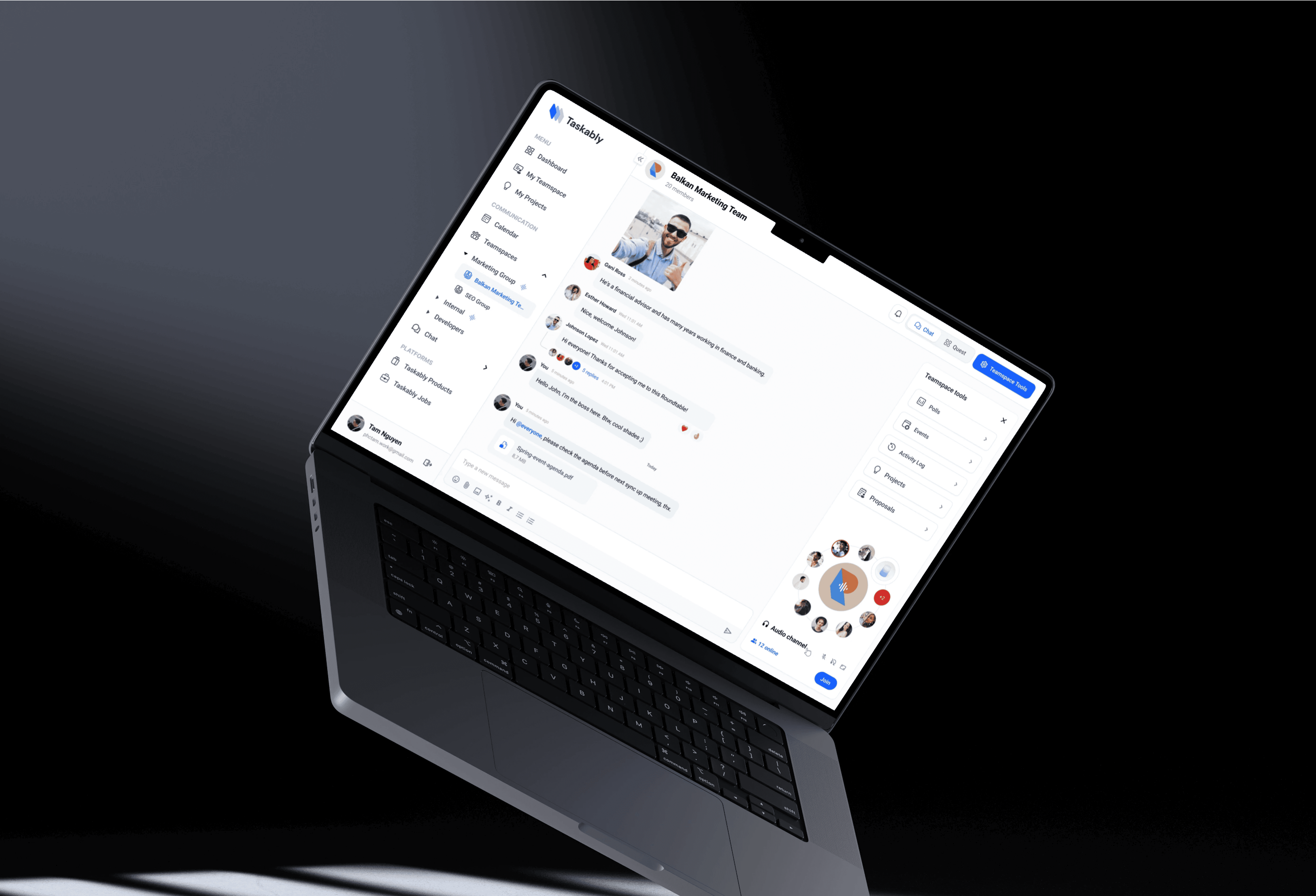
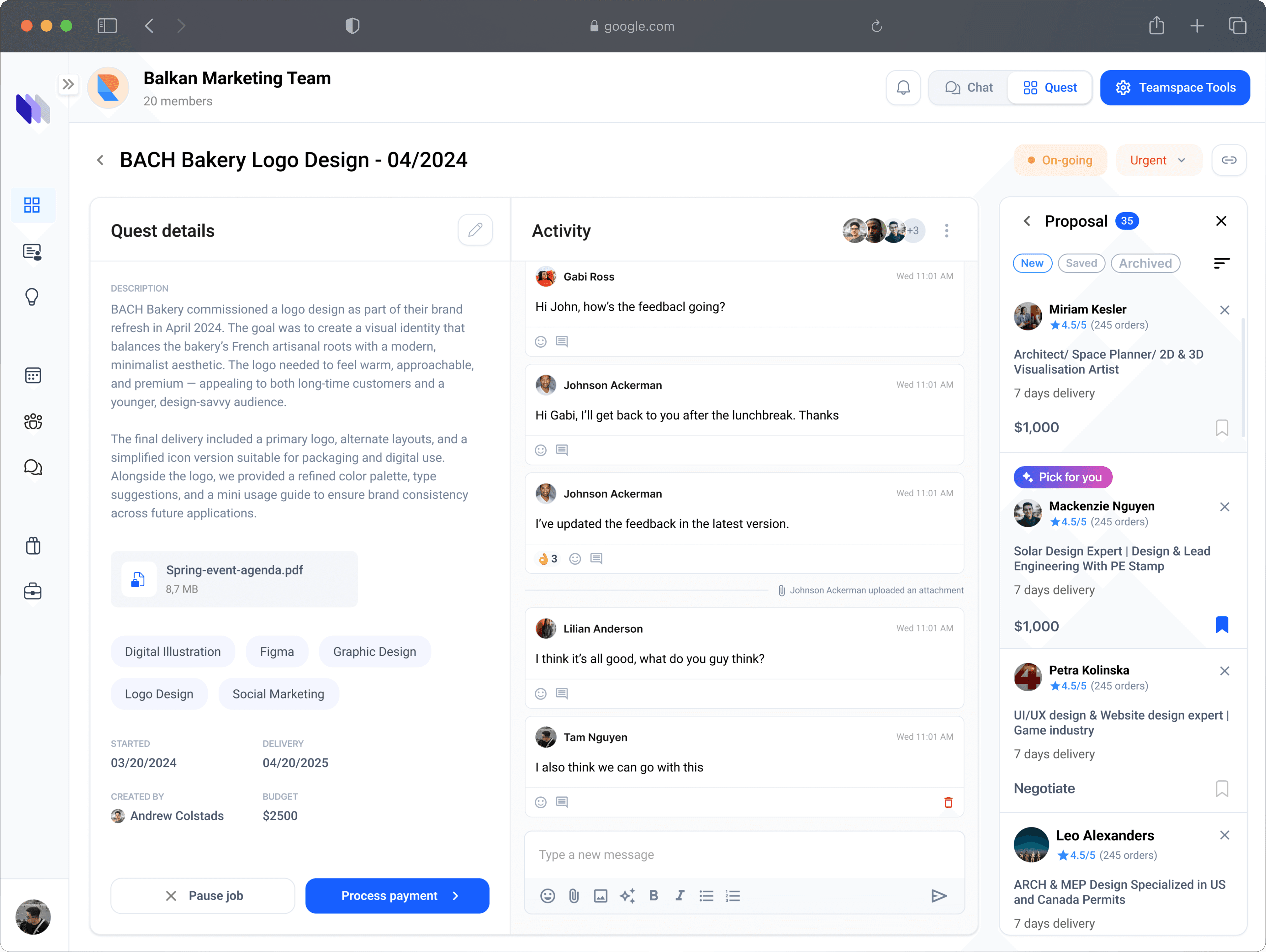
Integrated Communication – A built-in chat and collaboration hub that keeps project discussions, files, and decisions all in one place.
Integrated Communication – A built-in chat and collaboration hub that keeps project discussions, files, and decisions all in one place.
These screens highlight Lanceboard’s built-in messaging tools, designed to keep conversations flowing across teams and projects. From casual team chat to project-specific threads, users can share files, reply in context, and stay aligned — all without switching platforms.
—————————
A persistent sidebar gives quick access to proposals and roundtable tools, while features like reply chains, emoji reactions, and audio channels help replicate the energy of in-person teamwork.
These screens highlight Lanceboard’s built-in messaging tools, designed to keep conversations flowing across teams and projects. From casual team chat to project-specific threads, users can share files, reply in context, and stay aligned — all without switching platforms.
—————————
A persistent sidebar gives quick access to proposals and roundtable tools, while features like reply chains, emoji reactions, and audio channels help replicate the energy of in-person teamwork.
Marketing Site & Service Discovery UI
Marketing Site & Service Discovery UI
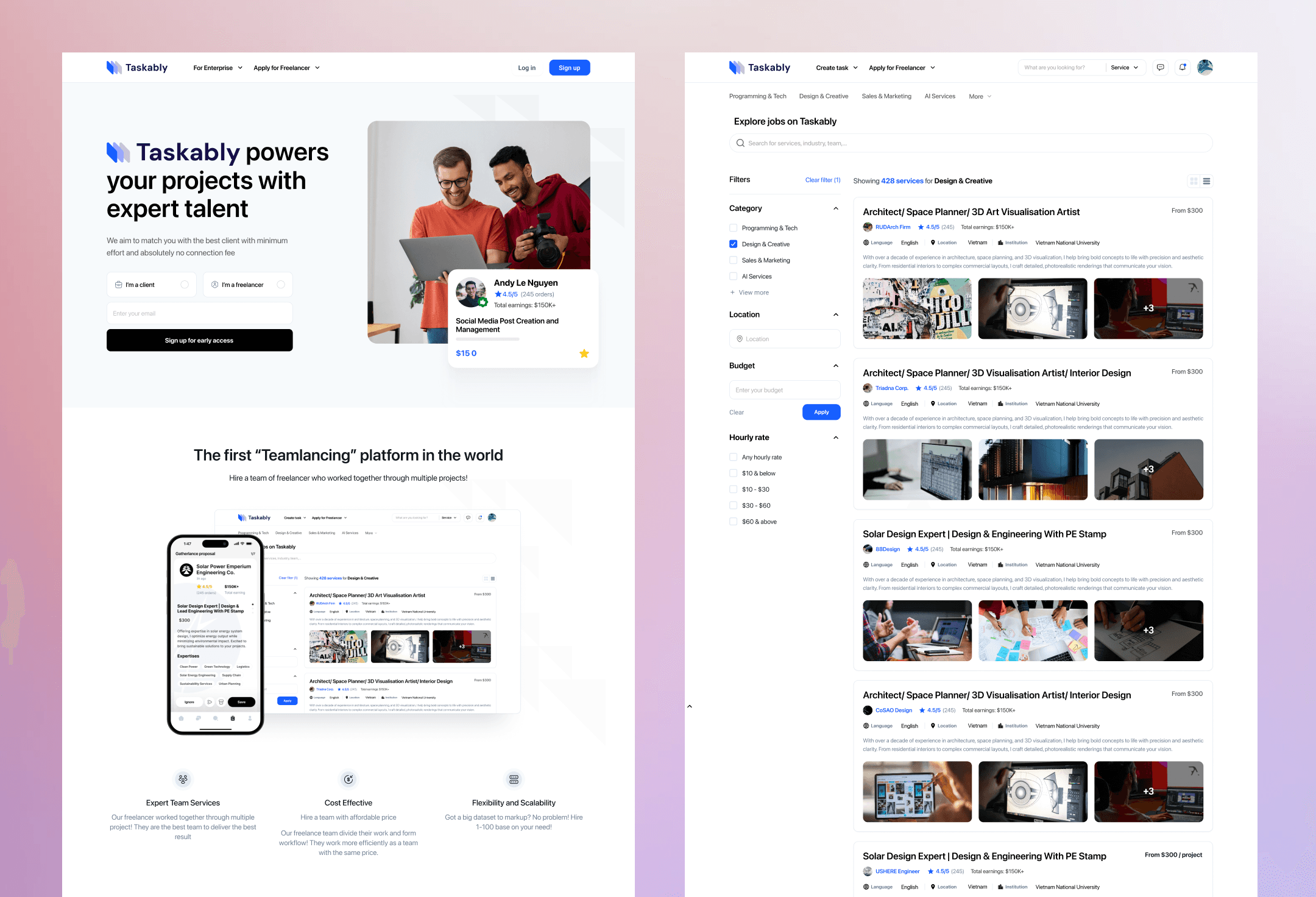
These two screens represent key examples of Taskably’s marketing presence and service discovery experience. The homepage introduces the platform with a bold headline, clear role-based entry points, and trust-building elements like testimonials and team highlights. The service browsing screen is designed for clarity and efficiency, featuring smart filters, rich service previews, and consistent visual hierarchy to help users evaluate talent with ease. Together, they demonstrate how Taskably turns first impressions into confident actions through purposeful interface design.
These two screens represent key examples of Taskably’s marketing presence and service discovery experience. The homepage introduces the platform with a bold headline, clear role-based entry points, and trust-building elements like testimonials and team highlights. The service browsing screen is designed for clarity and efficiency, featuring smart filters, rich service previews, and consistent visual hierarchy to help users evaluate talent with ease. Together, they demonstrate how Taskably turns first impressions into confident actions through purposeful interface design.